yazi. For that check out my article on yazi. This article focuses on extending yazi with my plugin search.yazi.Getting Started
search.yazi to work, make sure your yazi version is >= 26.1.22.search.yazi is in my dotfiles-yazi. Two ways to try it out:
1. home-manager
If you’re using home-manager, you can simply try out my exact yazi setup:
git clone https://github.com/kohane27/dotfiles-yazi.git
cd dotfiles-yazi
# copy the directory to your home-manager config, e.g.:
cp -r ./yazi- ~/.dotfiles/modules/home-manager/cli
2. Manual installation
git clone https://github.com/kohane27/dotfiles-yazi.git
cd dotfiles-yazi
mkdir ~/.config/yazi/plugins/
cp -r yazi/plugins/search.yazi ~/.config/yazi/plugins/
Then add some keybindings to ~/.config/yazi/keymap.toml:
[mgr]
prepend_keymap = [
  { on = [ "<C-f>" ],              run = "plugin search 'fzf_filename'",                       desc = "Find filenames (Fuzzy)" },
  { on = "f",                      run = "plugin search 'fzf_content'",                        desc = "Find contents (Fuzzy)" },
  { on = "F",                      run = "plugin search 'ripgrep_content'",                    desc = "Find contents (rg)" },
  { on = [ "z", "f" ],             run = "plugin search 'fzf_locate'",                         desc = "Find filenames globally" },
]
f for the mnemonic find.search.yazi: Orchestrator for fzf, fd and ripgrep
fzf, fd, ripgrep and zoxide are like the four horsemen of any modern CLI stack. They are very powerful in their own right, but using yazi as the orchestrator to symphonize them really takes it to the next level. And that’s why search.yazi is born.
1. fzf_filename
fzf_filename is using fzf and fd to search for files recursively under current directory.
Scenario: I know I have cloned the qmk repo and I need to find a chocofi image inside.
C-fto triggerfzf_filename- Search
qmk chocofi images - Confirm on the preview pane that
imagescontain the image I want - Press
Enter
Did you miss out how powerful that was? We are searching all the files and directories under ~/Temp/0-repo, which contains over 550,000 files and directories! Yet fd and fzf handled it like a beast, giving me the result in less than a second! I don’t even need to first go to qmk directory!
fzf_filename behaves differently when the target entry is a file. If I press Enter on a file, search.yazi opened it in Neovim:
I don’t even need to fully type out the repo name kokoro-tts: kokoro was enough for fzf to narrow it down.
2. fzf_content
fzf_content is using ripgrep and fzf to search for file content (strings inside text files). Let’s say I remember I have hello world inside a directory but I don’t remember which file or directory contained that string.
- Press
fto triggerfzf_content - Confirm the target on the preview pane
- Press
Enterto havesearch.yaziopen up that exact line in Neovim
As you can see, world hello was the actual content I was searching for, yet fzf_content can still find it!
3. ripgrep_content
Sometimes when I know what exact string to look for, fuzzy finding with fzf could be too noisy. Then I’d trigger ripgrep_content with F:
I could even switch from fzf_content to ripgrep_content on-the-fly:
- Press
fto triggerfzf_content - Searching
hello worldgives noisy results - Press
Ctrl-sto switch toripgrep_content - Press
Enterto havesearch.yaziopen up that exact line in Neovim
The reverse ripgrep_content to fzf_content also works to further filter the results.
4. fzf_locate
fzf_locate uses plocate to literally search your whole system for files. I rarely use it and it acts as a nuclear option if I’m completely clueless about a file.
search.yazi + zoxide
There are a lot of directories on my machine and I barely remember their locations. Let’s say I vaguely remember there’s a directory called images inside ~/Temp, but I don’t know exactly where it is. That’s where the combo zoxide + fzf_filename comes in handy:
C-gto triggerzoxideto take me to~/Temp(set up zoxide integration)Ctrl-fto triggerfzf_filenamefor narrowing the scope inside~/Temp- Search “images” for directories with
images/ Enteron the entry to have it open up in yazi for whatever needed next
Another example to search for a file:
C-gto triggerzoxideto take me to~/Temp/0-repoCtrl-fto triggerfzf_filename- Search “docker compose parakeet”
Enteron the entry to have it open up in Neovim
The beauty of fzf is fully realized here: fzf is typo resistant that I can see all the relevant results from all the repos until I find the docker-compose.yaml I need.
Another example. To search for a jq file under “Study Note” directory, my mind is literally just thinking about three words: “study note jq”:
There is native integration of zoxide for yazi (require("zoxide"):setup({ update_db = true })). I don’t need to care where “Study Note” lives: whether it’s under Downloads or Documents or some other deeply nested directory. As long as I have cd-ed into the directory before with yazi, it’s already recorded into zoxide db, and I can find it with zoxide.
Complete File system control
With search.yazi and zoxide, I have complete control over all the files and directories on my system: I don’t have to care at all about where the content is on my machine, not to mention the absolute paths or any particular nested directories. Searching for directories and files on my whole system is a breeze that takes no cognitive effort.
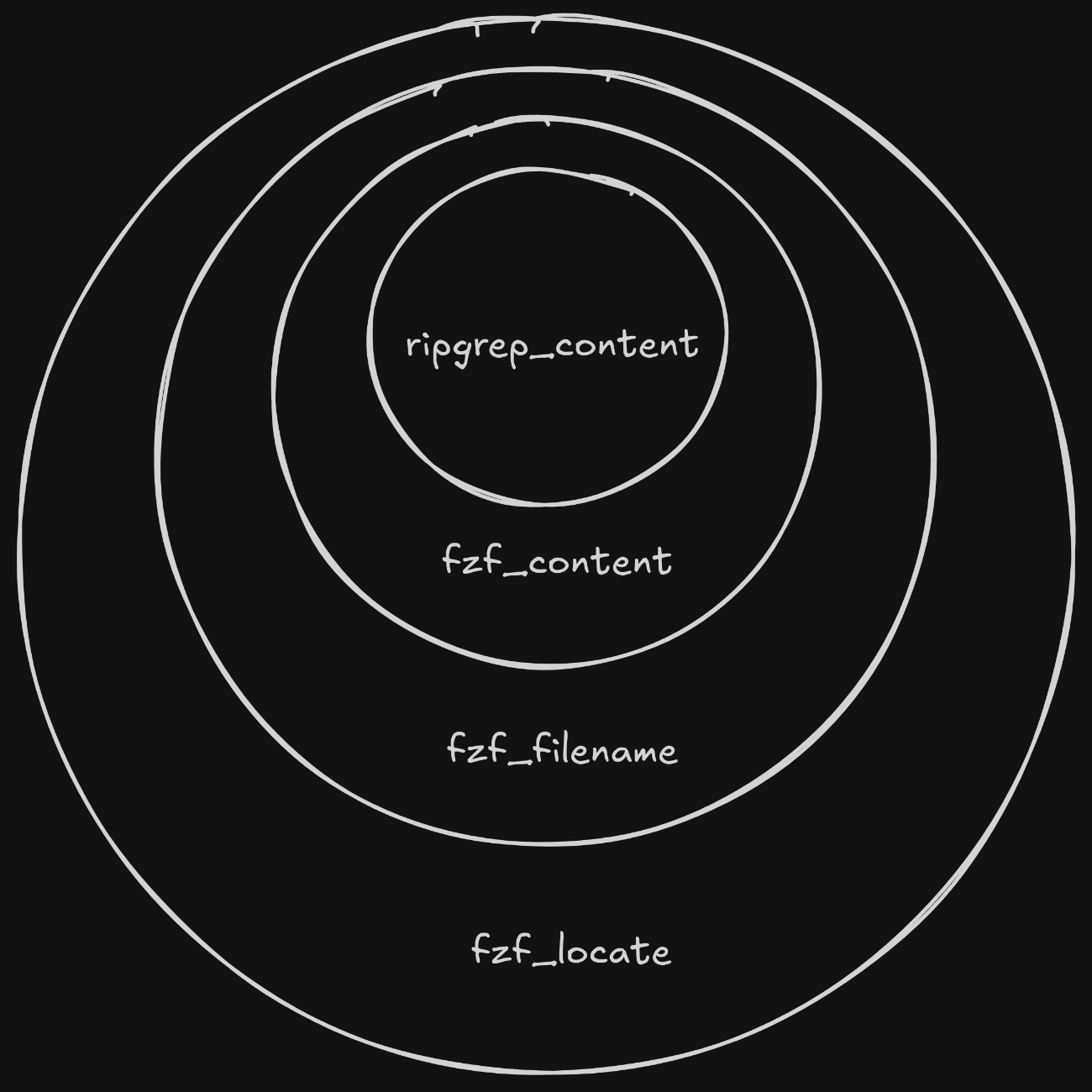
  flowchart TD
    A[ripgrep_content<br/><i>Exact string match</i>] -->|If no match / broader context needed| B[fzf_content<br/><i>Fuzzy find string</i>]
    B -->|If content not found / looking for files| C[fzf_filename<br/><i>Fuzzy find filenames</i>]
    C -->|If file missing| D[fzf_locate<br/><i>Fuzzy find filenames on whole system</i>]
The following image shows that different search strategies and ever increasing search scope depending on the target:
telescope.nvim or any search feature in an IDE?It’s true that any fuzzy finders like telescope.nvim support finding files and strings. But one big difference is that search.yazi is searching across ALL repos and directories at once. You can trigger it at ~/Documents and it’ll search for files or strings under that the whole ~/Documents. In other words, search.yazi is a system tool while telescope.nvim is a project tool.
Conclusion
I’ve only scratched the surface of what yazi can do with plugins. For a list of plguins, check out Resources and awesome-yazi for inspiration and keeping up to date with the current plugin landscape.