This demo shows that I can use my defined keybinding <Space>sn to have Spaced Repetition Plugin schedule and select reading materials for me. I can read the ones I’m interested in at the moment and postpone others.
Introduction
I have hoarded a lot of videos, articles, and books over the years. I could not keep up with the rate of new incoming materials, so I needed a system to organize, prioritize, and manage them for me.
Given Obsidian is my note-taking app of choice for many years (my article on Obsidian), I use Spaced Repetition Plugin to manage my reading and watch lists.
I use obsidian-vimrc-support to define the keybindings:
nmap <Space>sn :obcommand<space>obsidian-spaced-repetition:srs-note-review-open-note<CR>
nmap <Space>s1 :obcommand<space>obsidian-spaced-repetition:srs-note-review-hard<CR>
nmap <Space>s2 :obcommand<space>obsidian-spaced-repetition:srs-note-review-good<CR>
nmap <Space>s3 :obcommand<space>obsidian-spaced-repetition:srs-note-review-easy<CR>
When I press <Space>sn, it’d fetch a random note or the next due note in the queue based on the SM2 algorithm. Then I can decide if I want to continue with that note (watch the video or read that article). If I don’t feel like it, I’d press <Space>s3 (Easy = push it further down the queue); If I want to see it sooner, I’d press <Space>s1 (Hard = review sooner). When I find something interesting, I just copy and paste the content into lue.
The point of this scheduling queue is to eliminate friction of deciding what media to consume. My job is to ingest potential reading/watching materials into my vault and let it handle the scheduling for me. It also eliminates my tendency to just consume the latest articles or videos. If I keep prioritizing new materials, the old ones will never see the light of day.
How is it different than randomly selecting videos?
find ~/Videos -type f -iregex '.*\.\(webm\|mp4\)' | shuf -n 1 | xargs -d '\n' mpv
Three big differences:
- The Spaced Repetition Plugin has a scheduling mechanism
- I can use my custom note-taking templates in Obsidian
- obsidian-excalidraw-plugin can embed excalidraw drawings directly in my notes
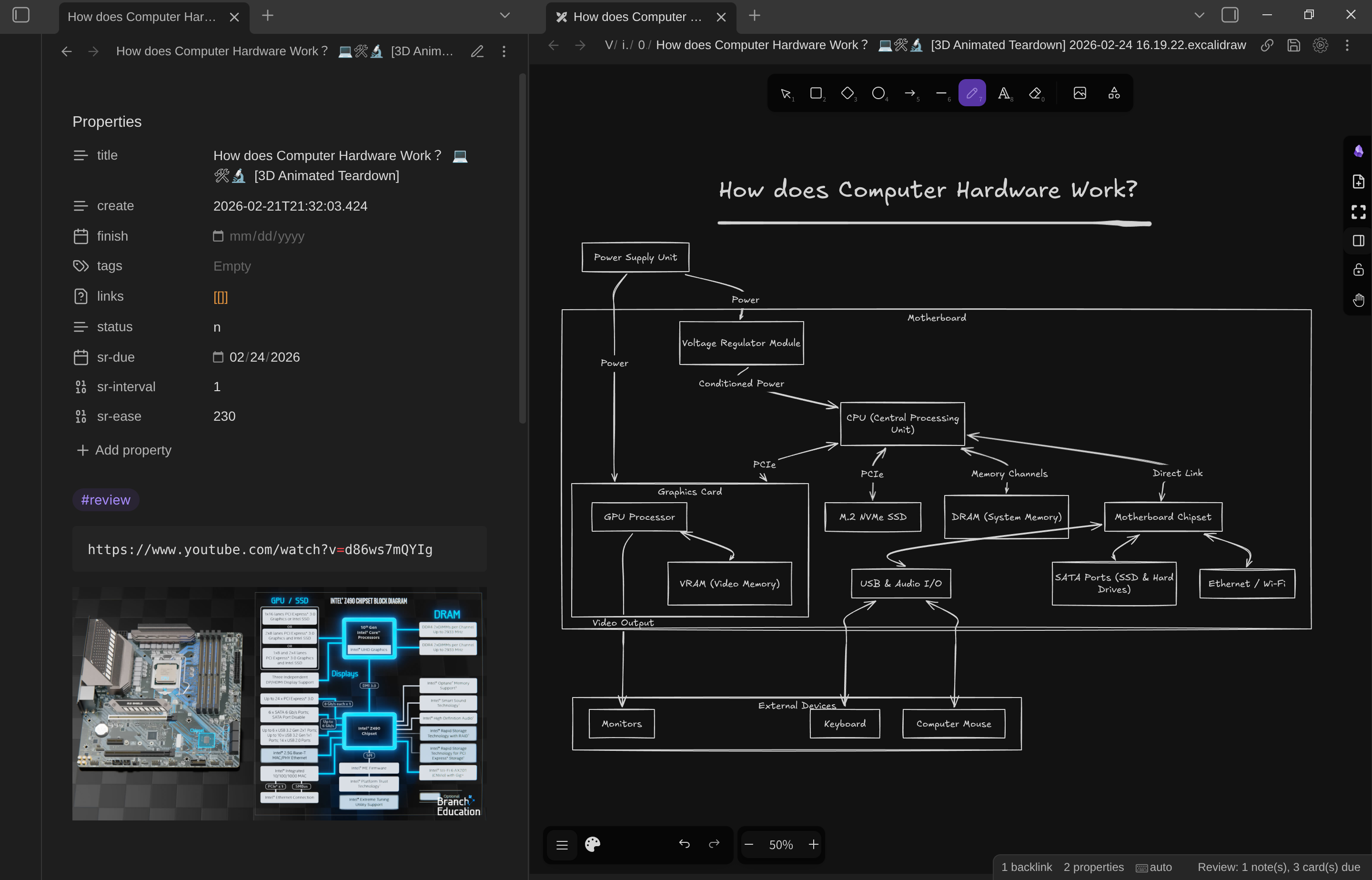
The video in the note is very dense. The video duration is 16 minutes. When I first came across this note, I watched only 5 minutes of the video. Then I pressed <Space>s1 to schedule it for future consumption. When that day came, I continued to watch and refine my drawing. I finished another 5 minutes and schedule it with <Space>s3 (to push it further down the queue because I was bored of the topic). Then when it surfaced up the queue again, I finished the video and the drawing. It means this material took me 3 sessions (scheduling intervals) to finish:
flowchart TD
subgraph Session1["Session 1 - Day 1"]
V1["Watch 5 minutes"]
D1["Create initial drawing"]
S1["<Space>s1<br/>Schedule +4 day"]
end
subgraph Session2["Session 2 - Day 5"]
V2["Watch 5 minutes"]
D2["Refine drawing"]
S3["<Space>s3<br/>Schedule +7 days"]
end
subgraph Session3["Session 3 - Day 12"]
V3["Finish video and drawing"]
end
V1 --> D1 --> S1 --> Session2
V2 --> D2 --> S3 --> Session3
V3
With the scheduling system, I don’t have to finish the video in one go. The scheduling queue always ensures that I will get back to it, no matter how far into the future. The alternative would be watching and drawing the video in a 1-hour sitting. Let’s say the total time spent on the material is the same (1 hour), but spaced repetition has it schedule across 12 days with a 20-minute interval. It also runs the risk that I got bored and never get to finish the material.
Conclusion
This system takes some getting used to. We are applying the SM-2 Spaced Repetition Algorithm on not just flashcards but also on review notes. If you have any questions, feel free to send me an email kohane27 at protonmail.com.